Pippit's 3D Director Studio lets you block a full action sequence before generating a single AI frame, and that changes how you direct
Two independent filmmakers have tested Pippit's new 3D Director Studio and reached the same conclusion: being able to stage characters, set poses, assign movements and plan camera angles on a timeline before sending anything to a video model is a fundamentally different way of working.
The hardest part of directing AI video has never been the generation itself. It has always been the step before: communicating intent to a model that has no idea where your characters are standing, which way they are facing, or how the camera is meant to move through a scene. You write a longer prompt. You add more adjectives. You generate twenty takes and pick the least wrong one. That is not directing. That is hoping.
Pippit's 3D Director Studio, tested independently this week by two working AI filmmakers, appears to attack exactly that problem. The core idea is previsualization: build the shot in 3D space first, confirm it looks right, then hand it to the video model. The generation step becomes the last step, not the first.
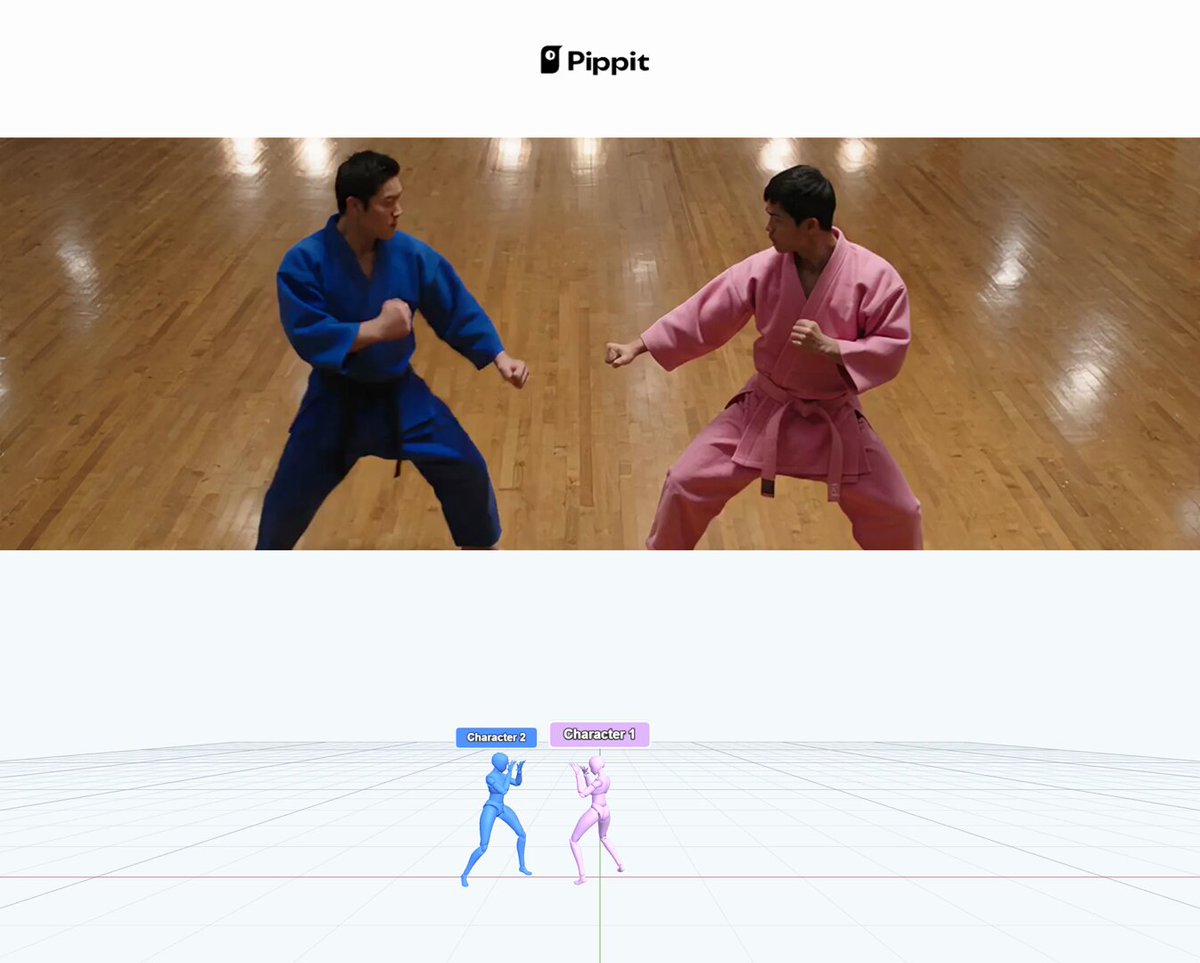
What testers actually built
Per creator @FellMentKE, the workflow for a two-fighter martial arts sequence went like this: place two character models to lock spacing and floor position, assign distinct movement types including grounded kicks and evasive footwork, then set the camera independently of the action. Nothing was generated until the blocking was confirmed. The point he flags is the one that matters most for action work: you can guarantee the fighters are the right distance apart before you spend a single generation credit.
Per creator @heyshrutimishra, the distinction she noticed was structural. Instead of compressing every pose, transition and camera angle into a single text prompt and then arguing with the output, she could set character position, pose, movement and timing on a timeline visually. The camera plan was separate from the character plan. Those are two different creative decisions, and collapsing them into one prompt has always been the source of most AI video misfires.
Both testers arrive independently at the same diagnosis: the problem with AI video direction has been that you are prompting for an outcome rather than constructing a plan. 3D Director Studio moves the tool closer to how a director actually thinks.
Why this sits differently from existing workarounds
The current alternatives are roughly three: write an extremely detailed prompt and iterate, use a separate 3D tool to generate reference frames and img2vid from those, or use Krea Agent's camera control layer before handing off to Seedance. Each involves friction. The reference-frame approach requires switching applications and managing image outputs. The Krea Agent route gives you camera control but not character placement.
What Pippit is offering is character placement, movement assignment and camera control inside a single interface, on a timeline, before generation. That is not a marginal workflow improvement. For action sequences and choreographed scenes specifically, where spatial relationships between characters define whether a shot reads correctly, this is the bottleneck that has been blocking serious narrative work.
What was not said
No independent benchmark exists yet comparing how faithfully the generated output matches the previsualized blocking. Both testers showed results but neither ran a systematic test across multiple generations. The critical question for action work is consistency: does the model honour the spatial plan across cuts, or does it drift? That is unknown.
No pricing detail for 3D Director Studio was mentioned in either post. Whether it sits inside an existing Pippit tier or represents an additional cost is not confirmed. No date for broader rollout was given beyond the implication that both testers had access this week.
It is also worth noting that both posts are positive. Neither tester reports a failure mode. Real-world edge cases, particularly complex multi-character scenes with intersecting movement paths, have not been documented publicly yet.
What to test first
If you have access, the most informative first test is not a showreel shot. Block a simple two-character scene where the spatial relationship is the whole point of the shot: two people facing each other across a table, or a subject walking toward camera while a second figure exits frame behind them. Generate the same scene twice from the same blocking. If the spatial plan holds across both generations, the system is doing something genuinely useful. If the outputs diverge significantly from each other or from the preview, you have learned the ceiling before committing to a longer project.
For action specifically, the kick-and-dodge scenario that @FellMentKE tested is the right stress test. The tell is whether the model respects the floor plane and relative character positions, or whether it reimagines the geometry entirely.
The broader promise here is that previsualization, the thing every live-action director does before anyone sets foot on set, is finally becoming a first-class step in the AI video workflow. Whether Pippit's implementation is robust enough to deliver on that promise at production scale is the question the next few weeks of community testing will answer.
---
Sources: announcement and martial arts sequence demo by @FellMentKE, independent workflow test by @heyshrutimishra