Dreamina's Clay Renderer Plugin turns GPT-6 Astra and Seedance 2.5 into a single Blender-to-final-shot pipeline that dozens of creators are already calling production-ready
A Dreamina plugin bridges GPT-6 Astra's 3D geometry coding and Seedance 2.5's video rendering via Blender in one click, locking camera and layout through the handoff and eliminating the manual export step that has always broken this kind of multi-tool workflow.
The workflow that AI filmmakers have been assembling in pieces, 3D blockout, video diffusion, consistent camera, affordable render, has quietly snapped together. Over the past two days, a wave of independent creators has been reporting the same finding: Dreamina's Clay Renderer Plugin connects GPT-6 Astra's geometry coding to Seedance 2.5's final-look rendering through Blender in a single click, with camera and layout locked all the way through. That is not a small thing.
The pipeline as described by multiple practitioners goes like this. You prompt GPT-6 Astra to build the scene's geometry and write the Blender script. Astra generates the code, Blender executes it, and you get a clay model with your camera positioned exactly where you want it. At that point, Dreamina's Clay Renderer Plugin takes over. One click sends the Blender scene directly into Dreamina, where Seedance 2.5 handles the visual rendering. Crucially, the original framing and layout stay locked. Seedance 2.5 is only adding the look, not rebuilding the shot.
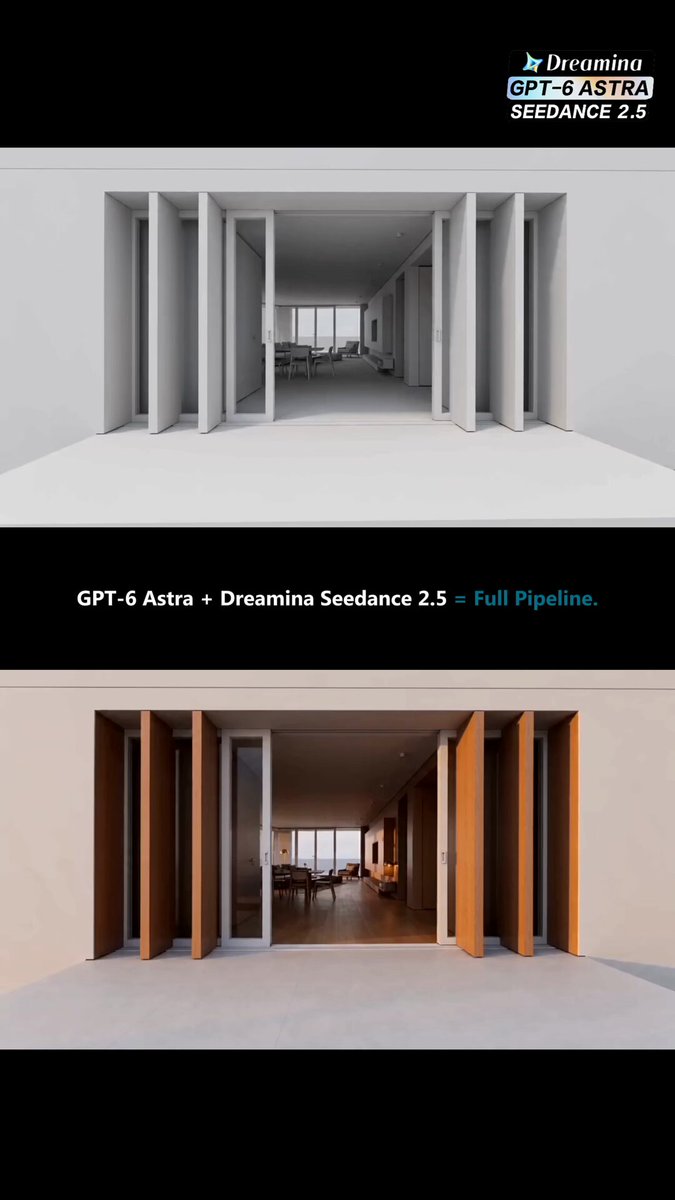
What the plugin actually solves
Anyone who has tried to chain 3D tools to video diffusion models will recognise the problem this addresses. The standard approach, export the model, reformat the file, re-import into a separate platform, re-establish the camera, hope the geometry survives the trip, is where most hybrid pipelines collapse. Even when the geometry arrives intact, the camera position is usually gone and the layout has shifted enough to require manual correction. Per creator @AIStackLabX, the plugin eliminates that step entirely: "No need to export the model, move files around, and load everything again. The structure you created stays in place, while Seedance 2.5 focuses on giving it the final look."
Creator @azed_ai goes further, noting that the simplicity surprised them: "I didn't expect the Blender-to-video part to be this simple." @GrowAIHub makes the production implication explicit: "The jump from a basic 3D structure to finished footage happens without the usual back-and-forth." The consistent thread across all accounts is that camera and composition are preserved, which is the property that makes this useful for anything resembling a planned shot.
On the cost side, @thetripathi58 reported that a render pass cost "less than lunch," and multiple accounts confirm you are paying standard Seedance 2.5 generation rates, not a pipeline premium. @Parul_Gautam7 and @n__deborah both specify that both Seedance 2.5 and 2.0 are available through the plugin at Dreamina's normal pricing.
Separately, @JSFILMZ0412 and @wavespeed_ai are running a closely related workflow via WaveSpeed's MCP integration, prompting the scene, blocking in Blender, exporting a playblast as a camera reference, then feeding that into Seedance 2.5. The WaveSpeed version adds an agent layer so the whole sequence can run without leaving the agent workflow. @wavespeed_ai describes the core argument for 3D anchoring plainly: "AI video consistency needs a 3D anchor, not more prompting."
What has not been said
No official release notes or version documentation for the Clay Renderer Plugin have surfaced in the posts reviewed. Every account of the workflow comes from independent creators rather than from Dreamina itself, which means the plugin's full feature set, any limitations on scene complexity, and its update cadence are unknown. No benchmarks exist for how reliably the camera lock holds across different scene types. Pricing specifics beyond "standard Seedance rates" have not been confirmed by Dreamina officially. The WaveSpeed MCP path is a separate product from the Dreamina plugin and serves a different user profile, specifically those already running agent-based workflows.
What is also absent is any discussion of what breaks. Complex geometry, physics sims, or character rigs have not been tested publicly. The reports that exist are all from creators working with relatively simple architectural or vehicle scenes. Whether the plugin handles dense animated meshes, or whether Seedance 2.5's layout-lock holds on longer clips, remains untested in the open.
What to try first
For a working AI filmmaker, the highest-value first test is a single controlled shot where you already know the camera angle and composition you want. Build it in Blender via Astra, verify the framing, then use the Clay Renderer Plugin to send it to Dreamina for a Seedance 2.5 pass. Compare the result against a direct text-to-video prompt for the same shot description. The specific thing to look for is whether the final rendered camera matches what you set in Blender, because that is the property the whole pipeline depends on. If it holds, you have a repeatable method for converting a written concept into a precisely framed video clip without guessing prompts or burning credits on iteration.
The broader implication is workflow-level. The gap between "I know what this scene should look like" and "I have a finished video clip of it" has historically required either expensive 3D production or repeated diffusion sampling. A one-click bridge between a geometry-generating AI and a video diffusion renderer, with camera state preserved, is the missing step that makes pre-visualisation practical for solo creators. Whether Dreamina's implementation is robust enough to depend on daily is what the next week of testing will reveal.