Seedance 2.5 has hit number one on the Video Arena leaderboard, and a new ComfyUI workflow lets you feed it raw Blender blockouts
Dreamina's Seedance 2.5 now leads the Video Edit category on the Video Arena leaderboard with a 23-point gap over its nearest rival, while creators are shipping spec ads, two-minute short films and a ComfyUI node that turns untextured Blender scenes into rendered footage.
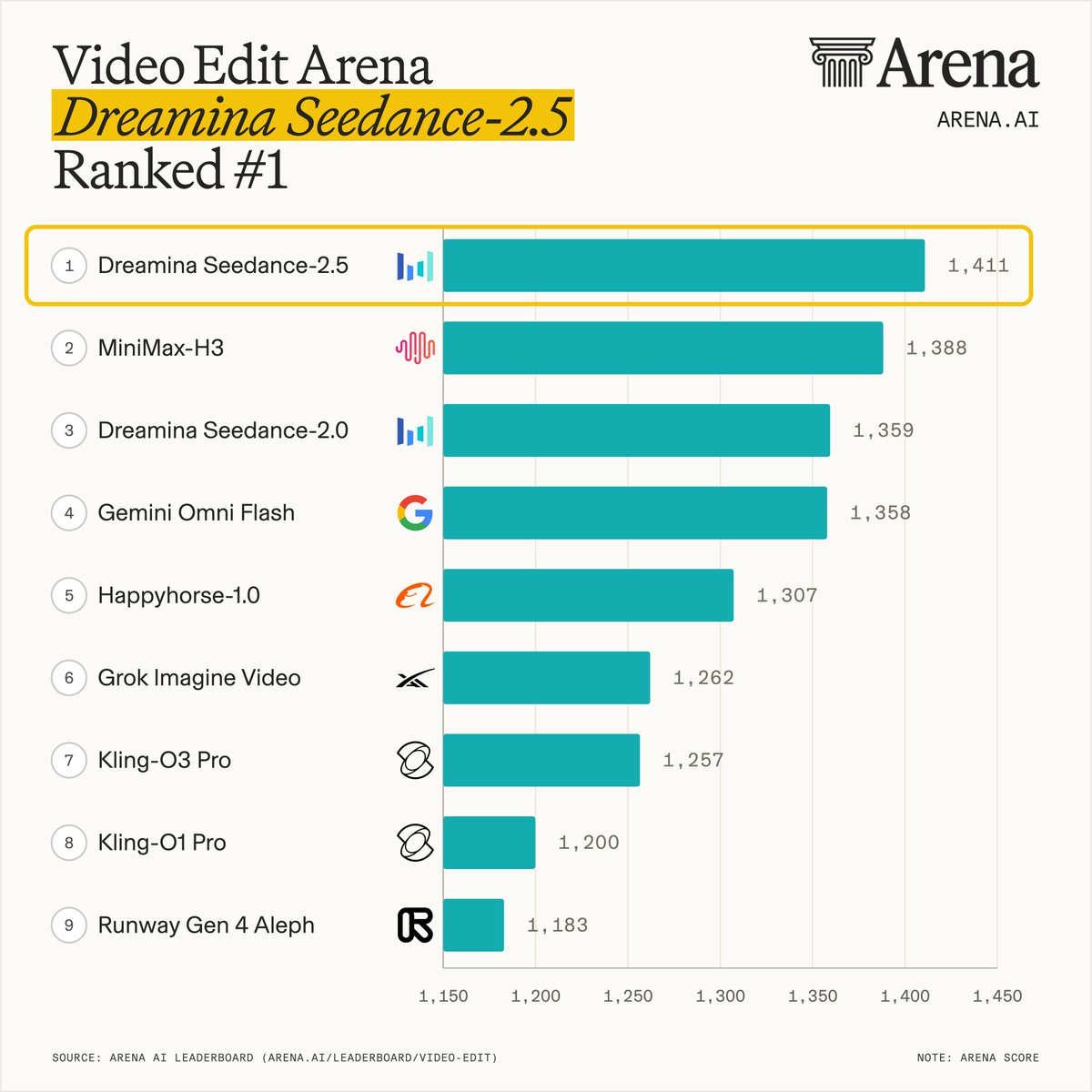
Seedance 2.5 has been circulating for less than a week and it is already reshaping the leaderboard. According to @arena, Dreamina Seedance 2.5 by @BytePlusGlobal now sits at number one in Video Edit, the newest capability category on Video Arena, scoring 1,411 points with a 23-point gap over its nearest competitor. In Image-to-Video it is second with 1,484 points, sitting just five points behind MiniMax H3. In Text-to-Video it ranks fourth at 1,477 points, level with its own 2.0 predecessor. Those are not cherry-picked benchmarks from a product page; they come from blind human preference votes on Video Arena, which makes them about as close to ground truth as public evaluation currently gets.
The practical consequence for anyone building AI video right now is that Seedance 2.5 is not just well-reviewed, it is measurably the strongest model available for edit-mode work, the category most relevant to post-production pipelines. That matters because edit-mode, where the model must respect an existing visual input and transform or extend it coherently, is precisely where most AI video tools break down. A 23-point gap on a nine-model leaderboard is a genuine signal, not noise.
What the community is actually doing with it
Across the same 48-hour window, three workflow-level posts are worth singling out. Per creator @ComfyUI, a published node now takes an untextured Blender blockout, no materials, no lighting, just camera, staging and timing, and feeds it alongside a reference image to Seedance 2.5, which then renders the scene. That collapses the iteration loop between 3D layout and final-look generation to a single pass. For previs artists or solo filmmakers who block scenes in Blender before committing to prompt-only generation, this is a concrete workflow upgrade worth testing immediately.
Elsewhere, per creator @Diesol, 1080p output has landed and is already being used for spec commercial work, specifically a Nike concept ad, suggesting the resolution and temporal consistency are holding up under the scrutiny of branded content expectations. Per creator @Dani__oros, a two-minute short film called Do Not Wake Her was completed in four days entirely within Dreamina, which is notable because maintaining character and scene consistency across a two-minute single-project timeline has been the ceiling most AI filmmakers have been bumping against.
Per creator @_CrownDEX, a 30-second single-take film with no cuts was entered into the Seedance 2.5 One Shot Challenge via Renoise AI, exploring narrative reversals across a continuous clip. The single-shot format specifically tests temporal coherence, the model's ability to sustain a scene without editorial help.
What has not been said
The Video Arena Video Edit category currently has only nine models on the leaderboard, per @arena. That is a thin field, and the ranking will shift as more models are added. Seedance 2.5's Image-to-Video score of 1,484 puts it just five points behind MiniMax H3, which sits at the top of that category; that gap is within noise at current sample sizes. No independent benchmark from a third party covering all three categories in a single controlled test has been published yet.
Pricing across platforms varies. CapCut lists Seedance 2.5 starting from $0.06 per second. Pollo AI is currently running a 50 per cent discount. The US launch on Dreamina and Pippit added a three-day perk of four free generations for new subscribers, which will have expired by the time most readers see this. No date has been announced for when the Video Arena leaderboard will expand its Video Edit field beyond nine models.
The ComfyUI Blender blockout workflow has been published with a link in the original post, but it has not been peer-reviewed or stress-tested publicly. How well it handles complex multi-object scenes or non-standard camera rigs is not yet known.
What to test first
If you work in Blender and you have never used AI video generation in your layout phase, the ComfyUI blockout node is the single highest-leverage experiment available right now. Block a simple scene, one character, one background, one camera move, export it without any materials applied, and run it through Seedance 2.5 with a reference image. The gap between your blockout and the rendered output will tell you immediately whether this fits your pipeline or needs more prompt engineering to control.
If you are already generating with Seedance 2.5 and hitting consistency problems across longer clips, the two-minute short from @Dani__oros is worth studying for its approach to scene structure. The film was made inside Dreamina, so the character reference tooling there appears to be doing meaningful work across that runtime. Four days is a real production timeline, not a weekend experiment.