Pippit's 3D Director Studio and CapCut PC are quietly becoming the most complete end-to-end pipeline for AI filmmakers who need a finished ad, not just a clip
Multiple creators are demonstrating a two-stage workflow that runs from 3D choreography in Pippit's Director Studio straight into Seedance 2.5 generation and CapCut PC editing, and the consistency it delivers over pure text-to-video prompting is significant.
Two frustrations have dogged AI video production since the first text-to-video models shipped: you cannot reliably block a scene before you generate it, and once the clip exists you have very little room to reshape it. This week, a cluster of creators has independently surfaced a pipeline that addresses both problems at once, and the combination is specific enough to be worth understanding properly.
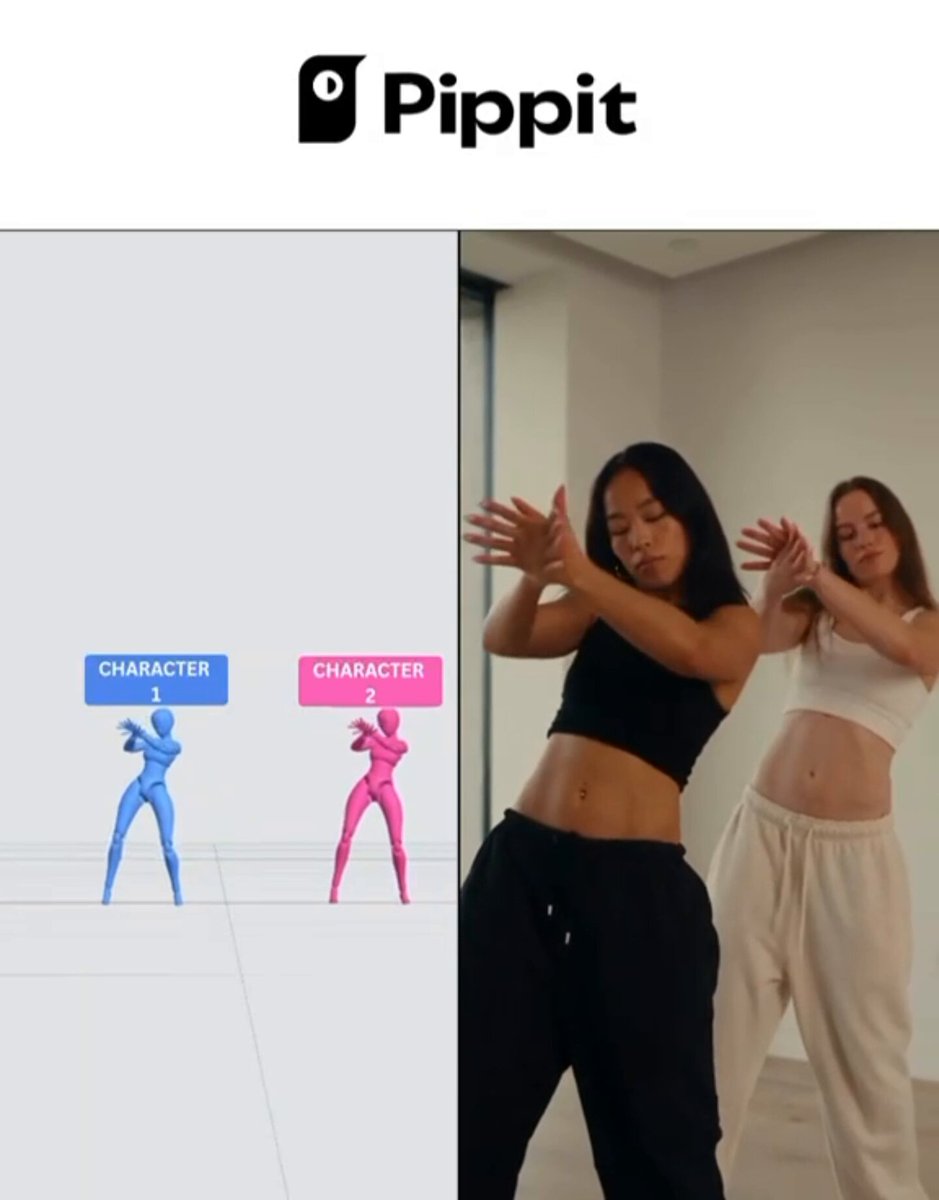
The workflow, demonstrated separately by @SeharShinwari and @VermaAakash3 among others, runs in three distinct stages. First, the scene is blocked inside Pippit AI's 3D Director Studio, which lets you choreograph character positions, camera angles and movement before a single frame of video is generated. Second, that 3D reference is handed to Seedance 2.5, which uses it to anchor character consistency, spatial positioning and action timing across the generation. Third, the resulting clip lands in CapCut PC's Video Studio, where it is treated as ordinary footage: trimmed, reordered, captioned, synced to audio, and cut to rhythm. As @arthurcollinsai put it bluntly, that final stage is "where a generated clip becomes an actual ad."
Why blocking matters more than prompting
The 3D pre-blocking step is the part most text-to-video users skip, and it is also the part that tends to determine whether a multi-shot sequence holds together. Describing choreography in a prompt is imprecise by nature. A 3D reference pass gives the model positional ground truth: where the character is in frame, which direction they face, how close the camera sits. @SeharShinwari specifically noted that the Seedance 2.5 output matched "the characters, positioning, and choreography" of the original 3D layout, which is a meaningfully stronger claim than simple stylistic consistency.
This matters because character drift across cuts remains one of the most visible failure modes in AI video production. If the 3D-reference approach genuinely suppresses that drift, it changes the economics of multi-shot work. Sequences that previously required extensive inpainting or re-generation passes might land closer to usable on the first attempt.
The CapCut PC layer and what it actually adds
The editing integration is worth separating from the generation story. @The_Kremlinn and @arthurcollinsai both made the same observation from different angles: the value of pulling Seedance 2.5 clips into CapCut PC is not convenience, it is creative control that only becomes visible after you have footage to look at. @ethancole_ai described this precisely, noting that seeing the storyboard rendered as video is when you discover that "the opening feels too slow" or "one scene needs more impact." You cannot know that from a prompt; you know it from footage.
CapCut PC's Video Studio also connects directly to GPT Image 2.5 for storyboarding via Design Studio and AI Image, per @Marco_Exito and @ethancole_ai. The resulting chain runs: GPT Image 2.5 for visual direction, Seedance 2.5 for motion, CapCut for assembly. What the 3D Director Studio variant adds is a pre-generation blocking pass between the image concept and the video generation, which is precisely the stage where spatial chaos tends to enter the pipeline.
What has not been said
No pricing details for the 3D Director Studio tier that enables full choreography have been confirmed in these posts. It is not clear whether the Seedance 2.5 integration with Pippit's 3D reference is a formal API handoff or a manual export-and-reimport step, which affects how repeatable the workflow is at scale. The claim that positioning is preserved across shots comes from creator posts, not from Pippit or ByteDance; it should be treated as a promising anecdote pending broader testing rather than a guaranteed feature. No generation speed or credit cost figures were shared.
What to test first
If you are already using Seedance 2.5 for multi-character or action-heavy sequences, the most direct test is to run your current prompt-only approach alongside a version that starts in Pippit's 3D Director Studio with matched camera and character blocking. The comparison will tell you quickly whether the reference layer is buying you meaningful consistency or whether your prompts are already performing well enough. If you are building branded content in CapCut PC, the GPT Image 2.5 storyboarding entry point is the faster onramp: start with a visual direction image, generate in Seedance 2.5, and evaluate the cut before committing to the 3D blocking investment. The pipeline is modular enough that you can adopt it one stage at a time.