Higgsfield tested Seedance 2.5 against two image models for film posters, and the video model kept the characters on model
Higgsfield ran one poster scene from its film Passport Rush through three models with the same nine references. Seedance 2.5 scored 7 out of 7 on its best take, and the caveats are as useful as the result.
Every AI filmmaker knows the moment. You finish the film, you make a poster, and the poster looks like a cousin of your lead. Same hair, slightly different face. @higgsfield_ai calls it going off-model, the animator's term for a character that drifts from its design. A good-looking image can still be the wrong character.
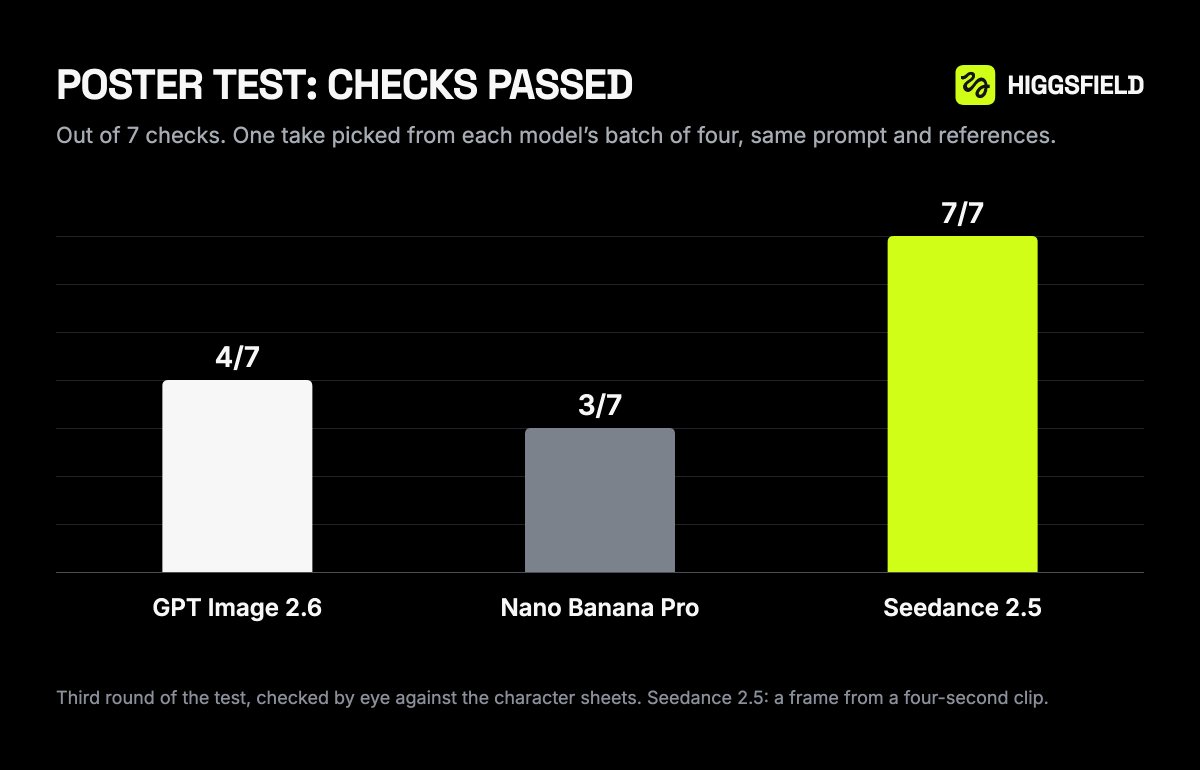
Higgsfield has now put numbers on a fix. It took one poster scene from its film Passport Rush and gave three models the same nine reference sheets and the same prompt. Judged against seven visual checks, the best take from GPT Image 2.6 passed 4 of 7. Nano Banana Pro passed 3. Seedance 2.5, a video model, passed all 7, and two of its four takes cleared every check.
What the test actually shows
The cleanest detail to audit was a taxi plate reading 667. Across 10 takes per model, GPT Image 2.6 got it right 9 times and Nano Banana Pro 3 times. Seedance 2.5 got it right all 10 times.
It was not flawless. Seedance misread a roof sign as 567 in two early takes. So the headline is not that video models never slip. It is that they slipped less on a scene built from your own references.
Higgsfield is also upfront about the limits. It was one scene, one style, judged by its own team, with a prompt written for video. Its own words: this does not prove video models beat image models everywhere. I would add that the company sells access to Seedance 2.5, so treat the scoring as a well-documented internal test, not an independent benchmark.
The workflow, step by step
The method is simple enough to copy this afternoon.
First, gather one reference image per character, prop and location. Higgsfield used nine. Use the same sheets you made the film with, and attach them in the exact order you will name them in the prompt. Image 1 means reference 1. Keep that mapping fixed.
Second, generate in Seedance 2.5 on Higgsfield with these settings: 4 seconds, 16:9, 1080p, audio off, references attached. Tell it to hold every character's pose for the whole clip, and allow a little dust or haze. Higgsfield's own result still had a slight camera push, though the characters stayed frozen.
Third, upscale the chosen clip to 4K, then export a frame as a full-resolution PNG. They used Topaz Video with Starlight Precise on Higgsfield. The advice is to upscale the clip, not a saved frame. You can also generate directly in 4K and skip the step.
Finally, add the title and logo in your image editor. That is the poster.
What it changes in a real workflow
The useful idea is treating a video model as a still-image tool. A frozen moment from a clip inherits the consistency work you already did for the film, and it comes with natural motion-blur-free poses. For a lead whose face has to match the screen, that is a real saving over regenerating with an image model and hoping.
The cost advice is sensible too. Test at 1080p first, and take only your favourite to 4K. Do not expect a hit every time. Higgsfield's final batch gave 2 clean takes out of 4, and the animation team behind the film made 24 takes for their own poster while exploring compositions. Budget for a batch, then choose.
What was not said
There is no cost per take in the thread, so you cannot yet work out what a poster costs. It also works best for a frozen moment from the film, not a collage or a minimalist layout, so it will not suit every poster style. There is no comparison against other video models, and no word on how it holds up with more than nine references or a more stylised look.
Higgsfield offers 3 days of unlimited access to all models for free through Higgsfield MCP. The trial auto-renews on Ultra 3K after 3 days, so set a reminder before you start.
What to test first
Run your own audit. Pick one detail that must never change, a plate, a sign, a scar, and count how many of 10 takes get it right in each model you use. That one number will tell you more than any vendor chart.
Source: the problem statement and off-model framing, the reference sheet step, the 7-check scores, the taxi plate audit, the Seedance settings, the 4K upscale step, the caveat.