GPT Image 2.5 is coming to CapCut and it turns visual storyboarding into the first step of a connected AI filmmaking pipeline
Multiple creators are mapping out a four-stage workflow — GPT Image 2.5 for storyboards, CapCut PC's multi-track timeline, Seedance 2.5 for generation, and AI Edit for refinement — and the announcement that the model is arriving inside CapCut's Design Studio and AI Image is what makes the whole chain viable without leaving the app.
The blank prompt has always been AI video's most dishonest starting point. You open a generator, stare at an empty field, and whatever comes out carries none of the visual logic you had in your head. GPT Image 2.5's arrival inside CapCut is a direct attack on that problem, and several independent creators mapping the same workflow in the past two days suggest the integration is going to land with real force.
Per creator @nijokestu, the core idea is that GPT Image 2.5 should be used before any video generation begins — not to produce a pretty standalone image, but to establish the visual language of the piece: scenes, mood, character look, pacing logic. The model will be accessible through two entry points inside CapCut: Design Studio and AI Image. From there, the storyboard moves directly into CapCut PC's multi-track timeline, Seedance 2.5 generates the first video pass, and AI Edit handles refinement. Per creator @Amaliarenzy, the critical operational gain is that a scene that feels wrong does not require starting over. You reshape the moment inside the same project.
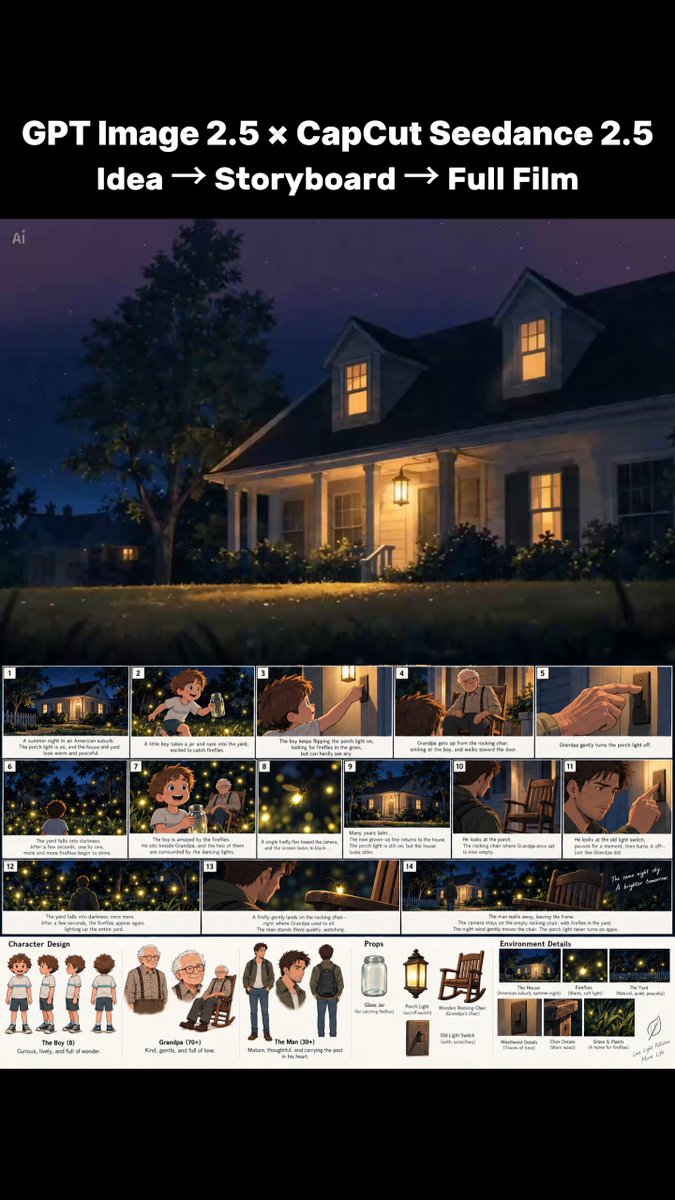
What the workflow actually looks like
The chain being described across these posts is consistent enough to treat as a consensus read of the integration. Step one: feed a story idea, product brief, or narrative concept to GPT Image 2.5 and produce a visual storyboard. Step two: import that storyboard into CapCut PC's multi-track timeline as the structural guide. Step three: use AI Video with Seedance 2.5 to generate the actual footage against that guide. Step four: use AI Edit to reshape pacing, extend shots, or fix individual moments without discarding the rest of the cut.
Per creator @Mr_Shahbaz_Ai, the philosophical shift matters as much as the technical one. The best AI workflow may not be about finding one perfect model, but about giving each model a clearly scoped job. GPT Image 2.5 owns visual direction. Seedance 2.5 owns motion. AI Edit owns coherence. That division of labour is what keeps creative control in the filmmaker's hands rather than delegating it entirely to a single generation step.
What this changes in a real production
The storyboard-to-generation gap has been AI video's most persistent friction point. Working filmmakers have been building that bridge manually: generating reference images in one tool, exporting them, uploading them elsewhere as visual prompts, then hoping the video model honours the aesthetic. The promise here, per creator @AIPandaX, is that the bridge becomes native. You never leave the CapCut environment, and the storyboard frames carry their visual logic forward into the generation step rather than being abandoned at the door.
For commercial production specifically, per creator @Diptish09, the gap between a product idea and a finished ad shrinks because the visual direction is codified in the storyboard before a single frame is generated. That is meaningful for anyone producing short-form advertising without a production budget.
What has not been said
No launch date has been announced. Every post uses the phrase "coming to CapCut", which confirms the integration is not yet live. There is no pricing information, no confirmation of which CapCut subscription tiers will include GPT Image 2.5 access, and no detail on whether the storyboard frames can be used as direct image references inside Seedance 2.5's generation interface or only as visual guides the filmmaker works from manually. That last point is the most important unknown. If the storyboard frames feed directly into Seedance 2.5 as reference inputs, the pipeline is genuinely tight. If they are only visual inspiration the filmmaker re-describes in a prompt, the friction reduction is real but more modest.
It is also worth noting that these posts are creator-led commentary on an announced integration, not a statement from CapCut or OpenAI directly. The workflow logic is credible and consistent, but the experience of actually using GPT Image 2.5 inside Design Studio, as opposed to planning to use it, remains unconfirmed.
What to test first
When the integration goes live, the first thing worth testing is whether a GPT Image 2.5-generated storyboard frame can be dropped into Seedance 2.5 as an image reference and produce footage that genuinely honours the established look. That single test will tell you whether this is a tightly coupled pipeline or a loosely connected set of tools that happen to share an interface. Per creator @n__deborah, using GPT Image 2.5 to define a story's full visual language rather than asking it for one standalone image is already producing more useful results in pre-production. The question is how much of that utility survives the handoff to video generation.
For working AI filmmakers, the arrival date is the only thing missing. The workflow is sound, the tools are proven individually, and the integration address a genuine problem. Keep Design Studio open when it lands.