ComfyUI has shared a Blender and Seedance 2.5 workflow that lets a 3D blockout control your camera, action and timing
ComfyUI's horror short The Disturbance Call uses a Blender blockout to lock camera, action and timing before Seedance 2.5 renders a frame. The workflow and prompt are public.
Every AI filmmaker knows the moment. You have the shot in your head. The camera creeps in slowly, the figure turns on the beat, the door opens at exactly the right second. Then the model gives you something close, and close is not the shot.
ComfyUI has just published a way to stop gambling on that. Its horror sequence THE DISTURBANCE CALL was made with Blender and Seedance 2.5, and the key detail is in the method. A 3D blockout controls the camera movement, the action and the timing. The AI video model then dresses that structure instead of inventing it. Per the @ComfyUI post, the workflow and the prompt are both included, with a link to try it.
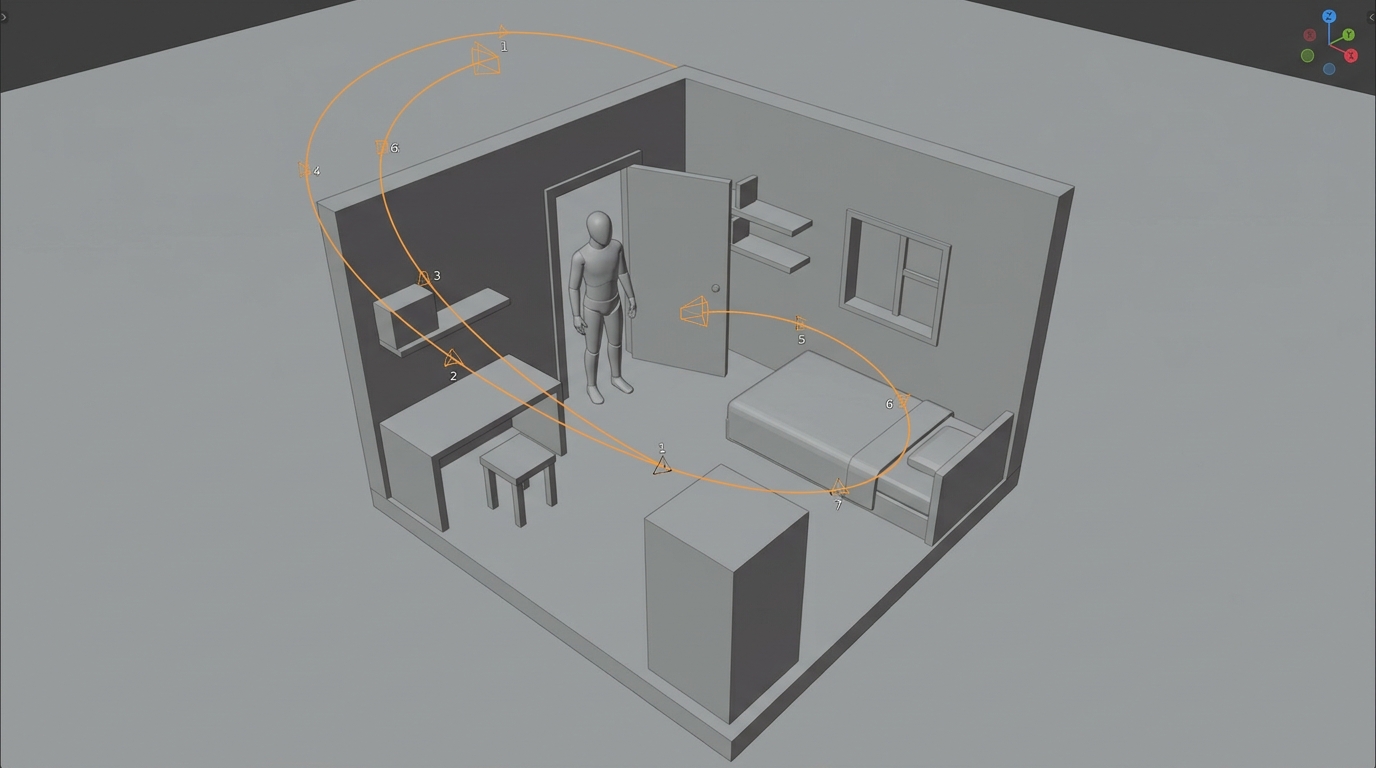
That is a big deal for anyone who cares about direction. Prompting camera language in words is a lottery. A blockout is a plan you can see before you spend anything.
What the workflow changes
The usual route is text first. You describe a slow push-in, hope the model reads it that way, and re-roll until it does. A blockout reverses the order. You build crude geometry in Blender, place the camera, animate the move, and time the action. That rough pass becomes the control signal for the final video.
For horror, this matters more than for most genres. Scares live on timing. A reveal that lands half a second early is just a shot of a hallway. Pacing, framing and blocking are the whole craft, and they are exactly what pure prompting handles worst.
It also fixes a continuity problem. If the same blockout drives several shots, your room layout and camera positions stay consistent from one clip to the next. You are not asking the model to remember a space. You are showing it one.
How it sits against the current alternative
The alternative most people use today is image-to-video from a still, plus camera instructions in the prompt. That works for single shots and falls apart when you need a sequence with defined geometry. Reference images help with look, but they say little about where the camera is going or when something should happen.
A blockout costs you time up front. You need basic Blender skills, or at least the patience to push cubes around a scene. But you are trading that for fewer wasted generations. If you have been burning credits chasing one specific move, that trade is probably in your favour.
What was not said
The post is short, and several things are unstated.
- Pricing. Nothing on what the workflow costs to run. Seedance 2.5 access depends on which platform or node route you use, and ComfyUI's post does not say.
- Hardware and setup. No requirements are given in the post itself. Check the linked page before you plan around it.
- How tightly the model obeys the blockout. The post says the blockout gives more creative control. It does not quantify that. One horror sequence is a demonstration, not a benchmark.
- Failure cases. Fast action, crowds and complex character motion are the usual weak spots for any control method. The post does not show where this one struggles.
- Availability. The post says to try the workflow through the link. It gives no date or version information beyond that.
What to test first
Start small. Build a single room in Blender with one camera move, around five seconds, and nothing else. Run it through the shared workflow and compare it with your best text-only attempt at the same shot.
Then test timing. Put one clear action beat, such as a door opening or a figure stepping into frame, at a fixed frame in the blockout. Check whether it lands at the same moment in the output. That single test tells you whether the control is real enough to plan a sequence around.
Finally, read the included prompt. The prompt in a controlled workflow is usually shorter and more about look than movement, because the blockout carries the movement. That is a useful habit to borrow even if you never open Blender.
If the control holds up, this is the most practical thing a director can add to an AI video pipeline right now. You get to decide the shot before the model does.
Source: ComfyUI's post showing THE DISTURBANCE CALL and linking the workflow